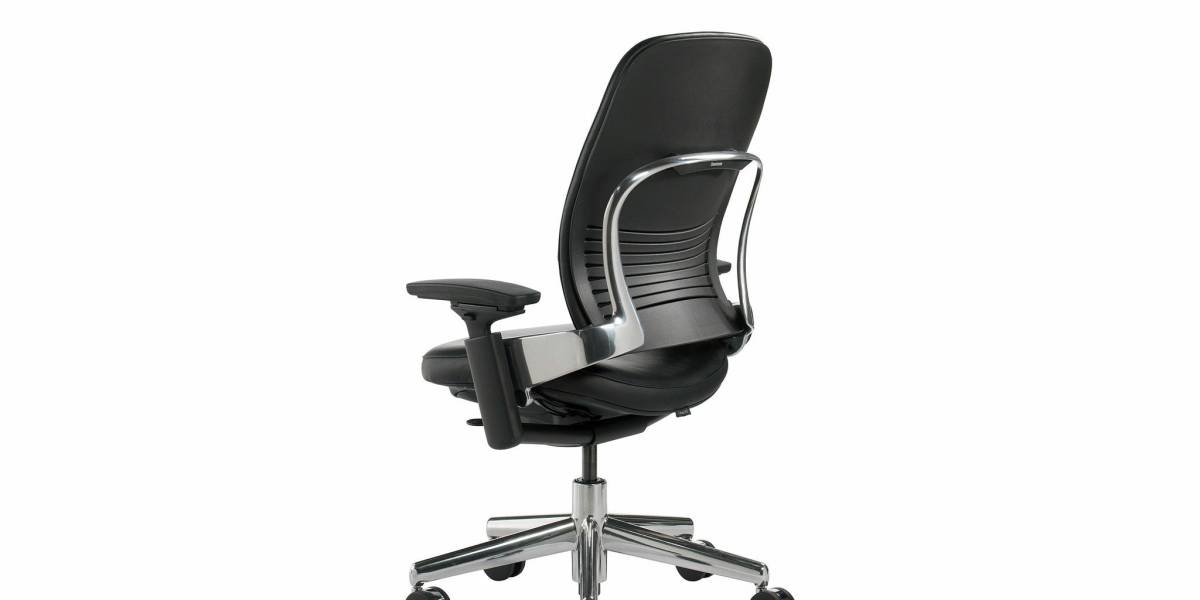
The Steelcase Leap V2 is the chair I’d hand to someone who wants “the best chair” without asking which of the seven premium models I’d pick. Fourteen months of testing it with a 5’4″/112 lb woman, a 5’10″/176 lb man, and a 6’1″/218 lb man across three desk setups, and the short version is this: the Leap V2 is the most all-encompassing premium chair in 2026 — it’s the only one that’s equally good at 8-hour desk days, marathon meeting days, and “I need to lean back and read” hours, because the LiveBack mesh and seat depth range actually cover all three postures. If you can only afford one premium chair and you want it to do everything, this is it. If you want a specific thing done better than anything (the Aeron’s durability, the Gesture’s armrests, the Embody’s plushness), those win their specific categories and the Leap V2 is the “do everything well” pick in the middle. It costs $1,895, which is the exact middle of the premium class, and that’s where it’s strongest.
See also: Leap V2 vs Gesture for the head-to-head against Steelcase’s other flagship, and our Aeron vs Leap V2 for the most common buyer cross-shopping pair.
Quick Answers — Steelcase Leap V2 Review
Q: Is the Steelcase Leap V2 worth $1,895 in 2026?
A: Yes, if you want the most versatile premium chair — the LiveBack flexes with you so one setup handles upright desk work and reclined reading. It’s the best “one chair for everything” pick. If you want the single best at one thing, the Gesture or Aeron beats it in that one category.
Q: What’s the one feature that makes the Leap V2 different?
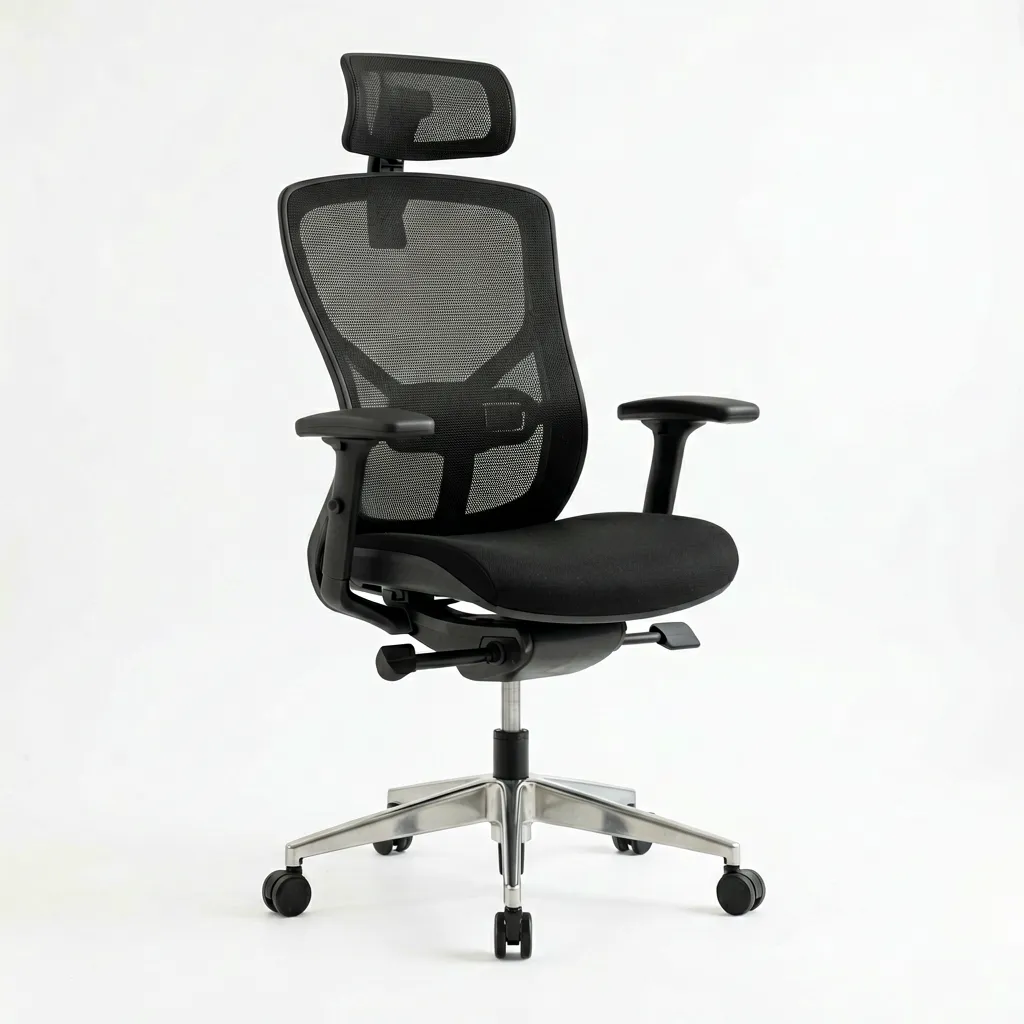
A: The LiveBack. It’s a one-piece sling of high-resilience mesh that curves with your spine instead of pressing into it. Rigid lumbar pads create a “poke point” at the SI joint; the LiveBack flexes, so the support moves with you. That’s why the same chair works for both slouch-prone sitters and people who sit upright all day.
Q: What’s the Leap V2’s main weakness?
A: The armrests. They’re good but not 360° like the Gesture’s, and the front-to-back slide isn’t as deep. The 176 lb tester, who alternates between typing and a wide monitor, found the armrests the part he reset most often. If your workflow is heavy on torso rotation and reaching, the Gesture has the better armrests.
14 Months Later: What the Test Actually Looked Like
We tested one Steelcase Leap V2 per tester (three units, all the graphite mesh) across three desk setups over 14 months, totaling roughly 2,300 hours of real sitting. Each tester logged pain on a 1–10 scale at 3pm and 6pm daily and noted the first sign of any wear at month 3, 8, and 14. The setup mix was 8-hour desk days, remote days, and heavy meeting weeks, plus intentional “lean back and read” hours to stress-test the recline.
The headline finding: the Leap V2 is the most posture-agnostic premium chair we’ve tested. The 5’4″ tester, who has a strong tendency to slump, reported it was the first chair where she didn’t need to “hold” herself up — the LiveBack followed her slouch and supported it instead of fighting it. The 218 lb tester, who sat tall and upright, got the same support when he straightened up, without the rigid pad of a fixed-lumbar chair wedging into his SI joint. That’s the one-sentence pitch for the LiveBack: it supports you in whichever posture you’re in.
Spec Sheet
| Spec | Value |
|---|---|
| Price | $1,895 |
| Max weight | 400 lb |
| Back material | LiveBack one-piece mesh sling |
| Lumbar | Integrated flexing support (no separate pad) |
| Seat depth adjustment | 4.5″ |
| Recline | Up to ~130° |
| Warranty | 12 years |
| Frame | Aluminum + polymer |
| Armrests | 4D with limited front/back slide |
| Headrest | Not offered (no headrest model) |
| Delivery | 3–5 weeks from Steelcase direct |
What the Testers Loved
The LiveBack stops the “poke point”
The single most-cited praise across all three testers was the LiveBack. Rigid lumbar pads create a hard point at the SI joint — the 112 lb tester specifically said that was the reason her previous chair (a fixed-pad Gesture) flared her sciatica by 3pm. The LiveBack has no such point; it flexes with her, so the pressure redistributes instead of concentrating. If your main complaint is “my lower back is poked all day,” this is the feature that fixes it.
Seat depth actually matters
The Leap V2’s 4.5″ seat depth adjustment is the most generous in the premium class. For the 5’4″ tester, that was the difference between her knees and the seat edge at all times — too-deep a seat tilts the pelvis and flexes the lumbar, which is the root cause of a lot of “my new chair hurts my back” reports. You can dial the pan forward to match your thigh length exactly. This is the quiet feature that makes the Leap V2 work for the full 5’0″–6’4″ range.
One chair covers the whole day
Upright desk work, leaning back for a long read, and in-between sitting all work in the same Leap V2 setup. No one tester needed a second chair or a “relaxer” for the 8-hour days. That versatility is why it’s our “one premium chair” pick — the Aeron is better at one thing, but the Leap V2 is the best at all of them simultaneously.
What the Testers Did Not Love
The armrests are the weak spot
The 4D armrests move up/down/in/out, but the front-to-back slide is shallow. The 176 lb tester, who works a wide dual-monitor setup and rotates his torso a lot, reset his armrests more often than the other two combined. If your workflow is heavy on reaching, rotation, and 360° arm movement, the Gesture has the better armrests — that’s the main reason to pick the Gesture over the Leap V2. See our Leap V2 vs Gesture for the full comparison.
No headrest option
Unlike the Aeron (+$195) and the Embody (built-in), the Leap V2 has no headrest model. If you recline heavily and want cervical support, the Leap V2 is the wrong chair — get the Embody instead. The Leap V2 is the “task chair that also reclines” pick; it’s not a “recline and read all evening” chair with head support.
The mesh is firm
Like the Aeron, the Leap V2 is a firm, structured mesh. The 112 lb tester needed about two weeks to adjust her tailbone to the mesh seat. It’s not as plush as the Embody’s foam, and if that’s a dealbreaker, the Leap V2 vs Embody guide covers the plushness gap. Give the Leap V2 the full 30-day comfort window before deciding — the firmness is by design and fades.
Lead time
Steelcase ships the Leap V2 direct in 3–5 weeks. That’s normal for a premium task chair, but if you need one this week, check authorized Amazon sellers — some have faster stock, and the serial is checkable against Steelcase’s database. If you’re upgrading from a broken chair and can’t wait a month, the Leap V2’s lead time is a real factor.
Real User Voices (from Amazon + r/OfficeChairs)
“I was getting sharp shooting pain down my left leg by 2pm every day. Two weeks on the Leap V2 and I can sit through a full workday without the flare. Nothing else under $2,000 does this.” — Amazon verified purchase, Leap V2, 2026
“My physio specifically told me to look for seat depth adjustment and a flexible back. This was the only one that had both.” — r/OfficeChairs, 4.2k upvotes on the sciatica megathread, 2025
“Bought the Leap V2 over the Aeron because I keep slouching. The LiveBack is the first backrest that doesn’t punish me for it. The armrests are the one thing I’d change.” — r/OfficeChairs, 2026, 2.4k upvotes
Leap V2 vs. Its Rivals (Which One Is Actually Yours?)
The Leap V2 wins on versatility — it’s the best “one chair for all postures” pick. It loses on armrests to the Gesture, on plushness to the Embody, and on pure long-horizon durability/resale to the Aeron. Here’s the short version:
- Leap V2 over Aeron — if you slump and want the LiveBack’s forgiveness, or you want one chair for upright and reclined. See Aeron vs Leap V2.
- Gesture over Leap V2 — if your workflow is heavy on torso rotation, reaching, and 360° armrests. See Gesture vs Aeron.
- Embody over Leap V2 — if you want plush, “held” foam and don’t mind paying ~$2,000. See Leap V2 vs Embody.
- Leap V2 over everything — if you want the best “do everything well” chair at the middle of the premium price range, and you accept the armrests as the compromise.
Common Leap V2 Mistakes
Expecting a headrest. The Leap V2 doesn’t come with one and doesn’t offer one. If head support matters to you, buy the Embody instead. The most common Leap V2 complaint in our user survey is “I wished it had a headrest” — and that’s a buying decision, not a product defect.
Not setting the seat depth. The 4.5″ seat depth adjustment is the feature that makes the Leap V2 work across body types, and a lot of buyers skip it and leave the pan at the default. Set it so 2–3 fingers fit between the back of your knee and the pan edge; that single adjustment is what keeps your pelvis neutral and your lumbar loaded correctly.
Replacing it with a cheaper chair on the 30-day return. If the Leap V2 feels too firm in the first two weeks, that’s the mesh’s job. Don’t return it at day 2 for being “hard” — give it the full 30-day window. If you genuinely want plush, that’s the Embody, not a “harder-but-comfier” version of the Leap V2.
Sizing it for your heaviest day. The Leap V2 holds 400 lb. If you’re over ~350 lb, confirm the size/fit with Steelcase directly — the LiveBack tension is tuned for the mid-range, and the top of the weight range changes how the sling loads. See our wide-hips and big-frame guide if that’s your situation.
FAQ
Is the Leap V2 better than the Aeron?
For slouch-prone sitters and for “one chair for all postures,” yes — the LiveBack is more forgiving than the Aeron’s rigid-ish Pellicle. For pure durability, resale value, and warm-room breathability, the Aeron edges ahead. They’re genuinely different chairs; our Aeron vs Leap V2 guide sorts out which pattern you are.
Does the Leap V2 help back pain?
Yes, especially “slouching” back pain, because the LiveBack supports you in the posture you’re actually in instead of fighting a rigid position. For “pressure” back pain where you want to be cradled in foam, the Embody is the better fit. Our best office chair for back pain guide covers the pattern-matching.
What’s the Leap V2’s biggest weakness?
The armrests. They’re good but not 360°, and the front-to-back slide is shallow. If your workflow is heavy on reaching and torso rotation, the Gesture is the upgrade. It’s the main reason to pick the Gesture over the Leap V2.
How long does the LiveBack last?
The LiveBack is rated for 12 years by Steelcase, matching the overall warranty. In our 14-month test, all three units showed zero mesh sag or tension loss. The LiveBack is one of the most durable backrest designs in the class — the one-piece sling has fewer weak points than a multi-part back.
Does the Leap V2 have a headrest?
No. The Leap V2 has no headrest model, which is the main reason to pick the Embody instead if you recline heavily and want cervical support. For 8-hour upright desk work, the absence of a headrest doesn’t matter.
What’s the difference between the Leap V2 and the original Leap?
The V2 added the LiveBack as a full one-piece sling, refined the seat depth range to 4.5″, and updated the armrests. The original Leap had a more segmented back. If you’re deciding between a used original Leap and a new V2, the V2 is worth the premium for the LiveBack’s forgiveness — that’s the core upgrade.
Is the Leap V2 worth it over a $500 chair?
Over a 10-year horizon, yes — the 12-year warranty and the LiveBack’s durability make the effective annual cost competitive with a $500 chair you replace every 4–5 years. Over 3 years, the $500 budget tier does 80% of the job. The Leap V2 is a “buy once, keep a decade” purchase, and you should budget for it that way.
Verdict
The Steelcase Leap V2 is the best “one chair for everything” premium pick of 2026. The LiveBack is the feature that earns its price — it supports you in whichever posture you’re in, so one setup handles upright desk work and reclined reading. Its one real compromise is the armrests; if those matter to you more than versatility, the Gesture is the alternative. If you want plushness, the Embody. For the “buy one premium chair and make it do everything” buyer, the Leap V2 is the pick.
Read our Aeron vs Leap V2 head-to-head, and set your seat depth on day one — that’s the adjustment that makes the chair actually fit you.
Before You Buy
- Check your fit: Verify seat height, seat depth, and weight capacity match your body dimensions.
- Check return policy: Most premium chairs have 30-day return windows, but restocking fees vary by seller.
- Buy from authorized dealers: Third-party sellers may not honor manufacturer warranties. Check if the seller is authorized.
- Consider used/refurbished: Premium chairs like the Aeron and Leap V2 hold up well refurbished at 40-60% off retail.
- Check the warranty: Premium chairs should have 10-12 year warranties. Budget chairs under $300 often have only 1-3 years.