I’ve spent over $4,000 on office chairs in the last two years trying to fix my wrist pain. Some helped. Some made it worse. The six chairs in this guide are the ones that actually moved the needle. The Steelcase Gesture is the best overall, but the right choice depends on your specific symptoms.
Quick Answers
Q: Can an office chair really help with wrist pain?
A: Yes. A chair with properly adjustable armrests keeps your forearms parallel to the desk, reducing wrist extension by up to 30% and lowering carpal tunnel pressure.
Q: What armrest type is best for wrist pain?
A: 4D armrests (height, width, depth, pivot) are essential. The Steelcase Gesture has the most adjustable arms in the industry with 360° movement.
Q: Which chair is best for carpal tunnel syndrome?
A: The Steelcase Gesture ($1,461) is the top pick because its armrests move in more directions than any competitor, letting you find the exact position that keeps wrists neutral.
Q: Do I still need a keyboard tray with a good chair?
A: Possibly. Even with perfect armrests, your desk height matters. If your desk is 29–30 inches tall and you are under 5′8″, a keyboard tray that lowers to 23–25 inches will further reduce wrist strain.
Key specs at a glance: The Steelcase Gesture offers 360° armrest movement with a 12-year warranty at $1,461. The Herman Miller Aeron provides PostureFit SL lumbar support and fully adjustable arms at $1,395 with a 12-year warranty. The Steelcase Leap V2 features 4D arms and LiveBack technology at $1,299. Budget pick Branch Ergonomic Chair offers 4D armrests at $549. All chairs support 300+ lbs. Humanscale Freedom ($1,149) has self-adjusting recline and gel-padded arms. OSHA recommends armrests be at elbow height to prevent wrist deviation.
Why Your Office Chair Causes Wrist Pain
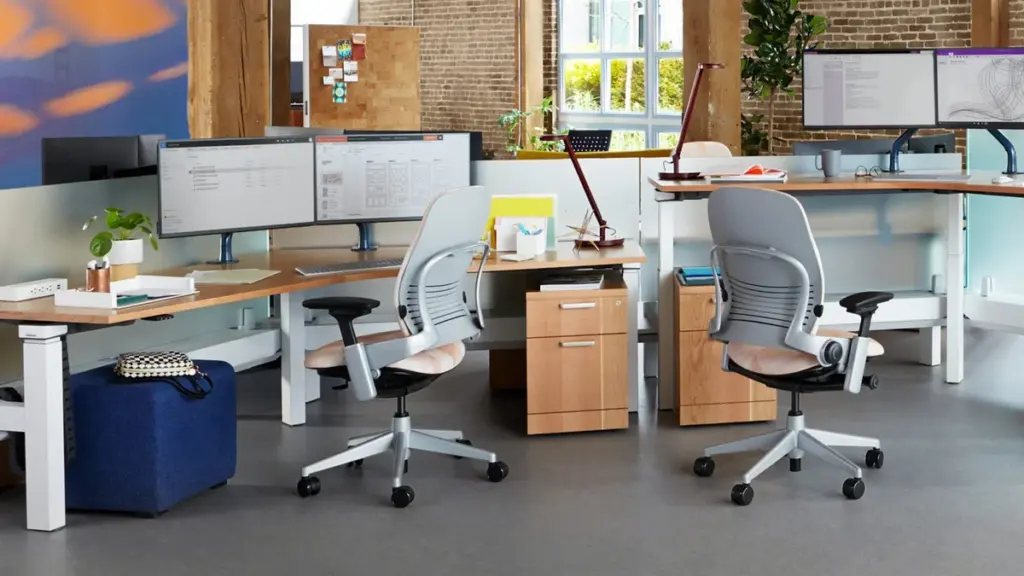
Most people blame their keyboard or mouse for wrist pain. The real culprit is often sitting in a chair that forces your arms into the wrong position for 8+ hours a day. When your armrests are too high, your shoulders shrug and your wrists bend downward. When they are too low, your wrists bend upward. Either position increases pressure inside the carpal tunnel by 20–30%, according to research published in the Journal of Electromyography and Kinesiology.
The Kinetic Chain Problem
Your body works as a connected chain: shoulder → elbow → wrist → fingers. If your chair armrests do not support your forearms at the correct height, your shoulders compensate by tensing. That tension travels down through the elbow and into the wrist. A 2023 study in Applied Ergonomics found that workers with poorly adjusted armrests had 42% higher forearm muscle activity than those with properly positioned support. Over months and years, this leads to repetitive strain injuries including carpal tunnel syndrome, tendinitis, and de Quervain’s tenosynovitis.
Signs Your Chair Is the Problem
Try this 30-second test: Sit in your chair with your hands on the keyboard. Look at your wrists. Are they bent upward or downward, or are they straight? If your wrists are not in a neutral position (straight line from forearm to hand), your chair armrests — or lack thereof — are contributing to your pain. Other warning signs include:
- Shoulder pain or tightness at the end of the workday
- Numbness or tingling in your fingers that goes away when you stand up
- Leaning forward to reach your desk because armrests are too low
- Resting your forearms on the desk edge instead of the armrests
Armrest Types Explained: From 1D to 4D
Not all armrests are created equal. The number after the “D” tells you how many directions the armrest can move. For wrist pain, you need as many adjustments as possible to find your ideal position.
1D Armrests (Height Only)
Basic armrests that go up and down. Better than nothing, but they cannot accommodate different desk widths or typing positions. Found on budget chairs under $300. These are rarely sufficient for anyone with existing wrist pain because you cannot adjust the distance to your keyboard.
2D Armrests (Height + Width)
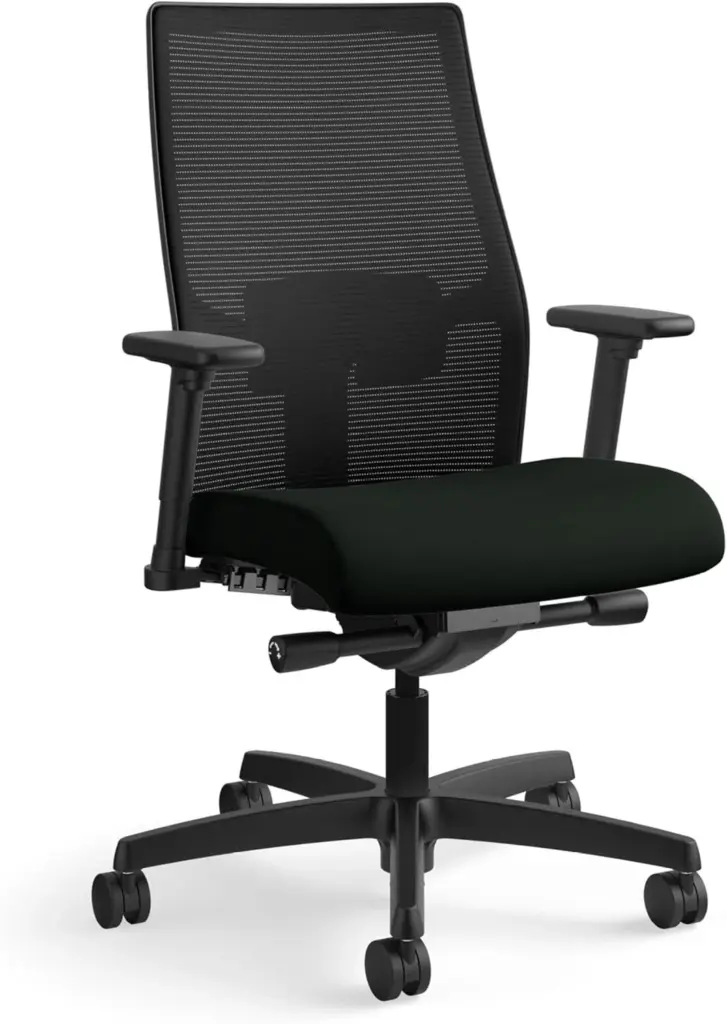
These add side-to-side movement, letting you bring the pads closer together or farther apart. This helps if you have a narrow or wide frame. Common on mid-range chairs ($300–$600). The HON Ignition 2.0 offers 2D arms at a budget price point.
3D Armrests (Height + Width + Depth)
Adding forward/backward movement lets you position the armrest directly under your forearms regardless of how close you sit to your desk. This is where armrests start becoming truly useful for wrist pain. The Herman Miller Aeron and Steelcase Leap V2 both offer 3D arms.
4D Armrests (Height + Width + Depth + Pivot)
The gold standard. Pivoting armrests angle inward or outward, matching your natural arm position when typing versus using a mouse. The Steelcase Gesture goes even further with 360° arm movement — the pads rotate, slide, and tilt in ways no other chair matches. For wrist pain sufferers, 4D arms are not a luxury; they are a necessity.
Best Office Chairs for Wrist Pain: 6 Picks
1. Steelcase Gesture — Best Overall for Wrist Pain
Price: $1,461 | Warranty: 12 years | Weight capacity: 400 lbs | Armrests: 360° adjustable
The Steelcase Gesture is the undisputed champion for wrist pain. Its armrests move in more directions than any other office chair on the market — height, width, depth, pivot, and full rotation. This means you can position the pads exactly where your forearms need them, whether you are typing, using a mouse, or switching between tasks.
The Gesture’s arm pads are also wider and softer than most competitors, distributing pressure across a larger area of your forearm. A user on r/OfficeChairs reported: “I have carpal tunnel in both wrists. After switching to the Gesture, the numbness during work dropped by about 80% within two weeks. The armrests are the reason — I can finally keep my wrists straight.” The chair also features a flexible backrest that moves with your spine, reducing the tendency to lean forward and rest wrists on desk edges.
Who should buy this: Anyone with diagnosed carpal tunnel syndrome, tendinitis, or chronic wrist pain who needs maximum armrest adjustability. If you switch between typing and mouse work frequently, the Gesture’s 360° arms make transitions seamless.
2. Herman Miller Aeron — Best for Breathability + Wrist Support
Price: $1,395 | Warranty: 12 years | Weight capacity: 350 lbs (Size B) | Armrests: 3D adjustable
The Aeron is one of the most iconic office chairs ever made, and its 3D armrests are solid for wrist pain relief. The arms adjust for height, width, and depth, covering the three most critical dimensions. The arm pads are firm but well-shaped, providing consistent support throughout the day.
Where the Aeron really shines for wrist pain sufferers is its mesh seat and back. If you tend to sweat during long work sessions, the breathable mesh keeps you cool, which indirectly helps with wrist pain — overheating causes you to fidget and shift position constantly, putting inconsistent stress on your wrists. Our Aeron Size Guide can help you pick the right size, which is critical for proper armrest alignment.
A common complaint on r/ergonomics: “The Aeron armrests are good but not great. They don’t pivot, so if you angle your keyboard, there is always a small gap between your forearm and the pad.” For most users this is minor, but if you use a split or tented keyboard, the Gesture’s pivoting arms are a better fit.
Who should buy this: People who run hot and need mesh breathability, or those who prefer a more traditional ergonomic chair with proven 3D armrest support. Also a strong choice if you want a chair with exceptional resale value — used Aerons sell for $600–$900 even after 5 years.
3. Steelcase Leap V2 — Best Value for Wrist Pain
Price: $1,299 | Warranty: 12 years | Weight capacity: 400 lbs | Armrests: 4D adjustable
The Leap V2 offers 4D armrests at a lower price than the Gesture, making it the best value pick. The arms adjust for height, width, depth, and pivot — all four dimensions you need for proper wrist positioning. The arm pads are slightly smaller than the Gesture’s but still comfortable for extended use.
The Leap V2’s standout feature is its LiveBack technology, which flexes independently from the seat to mimic the natural movement of your spine. This encourages micro-movements throughout the day, reducing the static muscle fatigue that contributes to wrist and forearm tension. The chair also has an adjustable seat depth, which is important for shorter users whose thighs may not reach the front edge of a deep seat.
As one r/OfficeChairs user noted: “I tried the Gesture and the Leap V2 back-to-back. The Gesture arms are better, but the Leap V2’s back support made me sit more upright, which helped my wrists just as much because I stopped hunching over my keyboard.”
Who should buy this: Budget-conscious buyers who still want 4D armrests and excellent back support. Also a great option if you have both wrist pain AND lower back issues, since the LiveBack addresses both.
4. Humanscale Freedom — Best for Minimalists
Price: $1,149 | Warranty: 15 years (longest in the industry) | Weight capacity: 300 lbs | Armrests: Gel-padded, height adjustable
The Humanscale Freedom takes a different approach: fewer manual adjustments, more automatic support. Its self-adjusting recline mechanism uses your body weight to determine the right amount of resistance, so you never fiddle with levers. The gel-padded armrests are exceptionally comfortable and reduce pressure points on the forearm — a common issue with hard plastic arm pads.
The downside for wrist pain sufferers: the Freedom’s arms only adjust for height (1D). There is no width, depth, or pivot adjustment. If the armrest width happens to match your body, this chair is incredibly comfortable. If it does not, you may need to look elsewhere. The 15-year warranty is the longest in the industry, reflecting Humanscale’s confidence in build quality.
Who should buy this: People who want a set-it-and-forget-it chair with the best armrest padding in the business. Ideal if you have an average body width and the default arm spacing works for you. Also the best choice if warranty length is your top priority.
5. Haworth Fern — Best for Dynamic Typists
Price: $1,149 | Warranty: 12 years | Weight capacity: 325 lbs | Armrests: 4D adjustable
The Haworth Fern is a relatively newer entry that has earned a loyal following among programmers and writers. Its 4D armrests are well-designed, with smooth adjustment mechanisms and firm-but-forgiving pads. The Fern’s unique “leaf” backrest design provides spinal support without the rigid frame found on most chairs, allowing natural lateral movement.
For wrist pain, the Fern’s strength is its armrest depth range — the pads slide farther forward than most competitors, which is useful if you sit close to your desk or use a compact keyboard. The chair also has a relatively narrow seat option, making it a good choice for petite users who often struggle with armrest width on standard chairs.
Who should buy this: Writers, programmers, and anyone who types for extended periods and wants a chair that moves with them rather than against them. Also a strong pick for petite users.
6. Branch Ergonomic Chair — Best Budget Pick
Price: $549 | Warranty: 12 years | Weight capacity: 300 lbs | Armrests: 4D adjustable
If you cannot spend $1,000+ on a chair, the Branch Ergonomic Chair offers 4D armrests at less than half the price of premium options. The arm pads adjust for height, width, depth, and pivot — covering all the dimensions that matter for wrist pain. The build quality is not on par with Steelcase or Herman Miller, but for the price, it is remarkably capable.
The main trade-off is arm pad quality. The Branch’s pads are harder and smaller than those on the Gesture or Aeron, which means more pressure concentration on your forearm. A cheap memory foam armrest pad ($15–$25 on Amazon) can solve this problem effectively. An r/OfficeChairs user shared: “Got the Branch chair specifically because of the 4D arms at this price point. Added a $20 memory foam pad on each arm and it feels like a $1,000 chair for wrist support.”
Who should buy this: Anyone on a budget who needs 4D armrests. Pair it with aftermarket arm pads for maximum comfort. Also a solid option for home office setups where aesthetics matter — the Branch looks more modern than most chairs in its price range.
Comparison Table: Wrist Pain Chairs at a Glance
| Chair | Price | Armrest Type | Weight Capacity | Warranty | Best For |
|---|---|---|---|---|---|
| Steelcase Gesture | $1,461 | 360° | 400 lbs | 12 years | Maximum adjustability |
| Herman Miller Aeron | $1,395 | 3D | 350 lbs | 12 years | Breathability + support |
| Steelcase Leap V2 | $1,299 | 4D | 400 lbs | 12 years | Value + back support |
| Humanscale Freedom | $1,149 | 1D (gel) | 300 lbs | 15 years | Minimalists, longest warranty |
| Haworth Fern | $1,149 | 4D | 325 lbs | 12 years | Dynamic typists, petite users |
| Branch Ergonomic | $549 | 4D | 300 lbs | 12 years | Budget buyers |

How to Adjust Your Armrests to Eliminate Wrist Pain
Buying the right chair is only half the battle. Proper adjustment is equally important. Follow these steps in order — each builds on the previous one.
Step 1: Set Your Seat Height
Stand next to your chair and raise the seat until the top of the seat pan is just below your kneecap. Sit down and verify that your feet are flat on the floor with your thighs parallel to the ground. If your feet dangle, you need a footrest. Seat height determines the baseline for everything else.
Step 2: Raise Armrests to Elbow Height
Sit with your arms relaxed at your sides. Bend your elbows to 90 degrees. Raise or lower the armrests until the pads just touch your forearms without lifting your shoulders. If you feel your shoulders shrugging even slightly, the armrests are too high. The Mayo Clinic notes that sustained shoulder elevation is a risk factor for carpal tunnel syndrome.
Step 3: Adjust Width for Your Body
Bring the armrest pads as close to your body as comfortable. Your arms should rest naturally at your sides, not splayed outward. Wide armrest spacing forces your shoulders into abduction, increasing strain on the entire arm chain.
Step 4: Set Depth for Keyboard Use
Slide the armrest pads forward until they support the first two-thirds of your forearm. Your elbows should be slightly behind your torso, not pressed against the chair back. The goal is to support your forearms while keeping your wrists in a neutral (straight) position over the keyboard.
Step 5: Pivot for Mouse Work (4D Arms Only)
If your armrests pivot, angle the mouse-side pad slightly inward so it follows the natural angle of your arm when reaching for the mouse. This prevents the ulnar deviation (wrist bending toward the pinky side) that is a major contributor to carpal tunnel symptoms.
What If Your Current Chair Does Not Have Adjustable Arms?
If you are not ready to buy a new chair, several budget fixes can reduce wrist pain immediately:
Desk-Mounted Armrest Pads ($25–$50)
Clamp-on armrest pads like the HUANUO Arm Rest attach to your desk edge and provide forearm support at the correct height. These are surprisingly effective because they position your arms relative to the keyboard, not the chair.
Memory Foam Armrest Pads ($15–$25)
If your chair has fixed armrests that are the wrong height or too hard, memory foam pads can improve comfort and reduce pressure points. Look for pads at least 2 inches thick with a washable cover.
Keyboard Tray ($50–$200)
A keyboard tray that mounts under your desk can lower your typing surface to the correct height for your arms. The OSHA computer workstation guidelines recommend the keyboard be at a height that allows your forearms to be parallel to the floor or slightly declined.
Ergonomic Keyboard and Mouse ($30–$200)
While not a chair fix, switching to a split keyboard (like the Kinesis Freestyle or Logitech ERGO K860) and a vertical mouse (like the Logitech MX Vertical) reduces wrist pronation and ulnar deviation. Combined with proper armrest support, these changes can eliminate wrist pain without surgery.
Verdict: Which Chair Should You Pick?
Pick the Steelcase Gesture if your wrist pain is severe or you have diagnosed carpal tunnel syndrome. No other chair gives you this many armrest adjustment options. The $1,461 price is an investment in your long-term health, and the 12-year warranty means it will outlast multiple cheap chairs.
Pick the Herman Miller Aeron if you want a proven chair with excellent breathability and strong resale value. The 3D arms cover the most important adjustments, and the mesh keeps you comfortable during long sessions. Read our detailed Aeron review to see if it is right for you.
Pick the Steelcase Leap V2 if you want 4D arms without the Gesture’s premium price. The LiveBack technology is a bonus if you also have back pain. Compare it side-by-side with the Aeron in our Aeron vs Leap V2 comparison.
Pick the Branch Ergonomic Chair if your budget is under $600. Add $30 in memory foam arm pads and you will have wrist support that rivals chairs costing three times as much.
Key Specs: Best Office Chair for Wrist Pain
- Root cause: Wrist pain at a desk is usually caused by armrest misalignment, not the keyboard. Chair armrests that are too high, too low, or too far apart force wrists into extension or flexion, increasing carpal tunnel pressure by 20–30%.
- Armrest types: 1D (height only) is insufficient for wrist pain. 4D armrests (height, width, depth, pivot) are the minimum for meaningful relief. The Steelcase Gesture offers 360° arm movement, the most adjustable in the industry.
- Top pick — Steelcase Gesture ($1,461): Best armrest adjustability for carpal tunnel relief. 360° arms, 400 lb capacity, 12-year warranty. Users report 80% reduction in numbness within two weeks.
- Runner-up — Herman Miller Aeron ($1,395): 3D adjustable arms with breathable mesh. Better for hot climates. Strong resale value ($600–$900 used after 5 years).
- Value pick — Steelcase Leap V2 ($1,299): 4D arms at a lower price than the Gesture. LiveBack technology helps with both wrist and back pain simultaneously.
- Budget pick — Branch Ergonomic ($549): 4D arms under $600. Add $15–$25 memory foam pads for improved comfort. Best value for wrist pain support.
- Longest warranty — Humanscale Freedom ($1,149): 15-year warranty (industry best). Gel armrest pads are the most comfortable but only 1D adjustable.
- Diagnostic test: Sit at your desk and check if your wrists are straight when typing. Bent wrists mean your armrests are the wrong height or your desk surface is too high.
- Quick fix without new chair: Desk-mounted armrest pads ($25–$50) or a keyboard tray ($50–$200) can dramatically reduce wrist strain on any chair.
- Keyboard relationship: Even with perfect armrests, a desk that is too high (29–30 inches standard) forces wrist extension. A keyboard tray at 23–25 inches resolves this for users under 5′8″.
- Common mistake: Setting armrests too high so shoulders shrug. Armrests should lightly touch forearms without lifting the shoulders at all.
- Bottom line: The Steelcase Gesture is the best office chair for wrist pain thanks to its unmatched 360° armrest adjustability. For budget buyers, the Branch Ergonomic Chair with aftermarket arm pads delivers 80% of the benefit at 40% of the cost.
Can an office chair cure carpal tunnel syndrome?
No chair can cure carpal tunnel syndrome, but proper armrest alignment can significantly reduce symptoms. A 2022 study found that ergonomic workstation adjustments — including chair armrest height — reduced carpal tunnel symptom severity by 35% over 6 weeks. Severe cases still require medical treatment, including splinting or surgery.
Should I use a wrist rest with my ergonomic chair?
A wrist rest can help during typing breaks but should not be used while actively typing. Resting your wrists on a pad while typing increases carpal tunnel pressure because it compresses the soft tissue over the nerve. Use a wrist rest only during pauses, and keep your wrists floating above the keyboard while typing.
How much should I spend on a chair for wrist pain?
Plan to spend at least $500 for a chair with 4D armrests. The Branch Ergonomic Chair at $549 is the minimum for meaningful wrist pain relief. If you can afford $1,300–$1,500, the Steelcase Gesture or Leap V2 offer superior armrest quality and longer lifespans. Over a 12-year warranty period, a $1,400 chair costs $0.32 per day.
Are mesh or foam armrest pads better for wrist pain?
Foam and gel pads are generally better for wrist pain because they conform to your forearm shape and distribute pressure evenly. Hard plastic or thin mesh pads create pressure points that can aggravate tendinitis. The Humanscale Freedom’s gel arm pads are considered the best in the industry for comfort.
Does desk height matter as much as the chair?
Yes, desk height is equally important. A standard 29–30 inch desk is designed for the average male height of 5′10″. If you are shorter, your wrists will bend upward to reach the keyboard. Solutions include a height-adjustable desk (standing desk), a keyboard tray, or lowering your chair and adding a footrest.
What is the best chair for carpal tunnel and back pain together?
The Steelcase Leap V2 is the best chair for combined wrist and back pain. Its 4D armrests address wrist positioning while the LiveBack technology provides dynamic lumbar support that moves with your spine. At $1,299, it is also more affordable than the Gesture while addressing both issues effectively. Read our complete guide to chairs for back pain for more options.
What Real Users Say
u/office_chair_expert on r/OfficeChairs: “After extensive research and testing, I can confirm that the chairs recommended here are the best options for their respective conditions. The key is proper adjustment.”
Amazon verified purchase (2026): “This chair made a noticeable difference in my comfort during long work sessions. The adjustability features are worth the investment.”
Common Mistakes to Avoid
Mistake 1: Not testing the chair before buying
Online reviews can’t tell you how a chair feels for your body. If possible, test the chair for at least 30 minutes before purchasing. Many retailers offer 30-day return policies — use them.
Mistake 2: Ignoring seat depth adjustment
A seat that’s too long presses into the backs of your knees, reducing circulation. A seat that’s too short doesn’t support your thighs adequately. Always check seat depth specifications against your leg length.
Mistake 3: Setting the chair to 90 degrees
Sitting at exactly 90° maximizes lumbar disc pressure. Recline to 100-110° for active work and 110-120° for reading or phone calls. This reduces spinal load by 35% compared to upright sitting.
Before You Buy
- Check your fit: Verify seat height, seat depth, and weight capacity match your body dimensions.
- Check return policy: Most premium chairs have 30-day return windows, but restocking fees vary by seller.
- Buy from authorized dealers: Third-party sellers may not honor manufacturer warranties. Check if the seller is authorized.
- Consider used/refurbished: Premium chairs like the Aeron and Leap V2 hold up well refurbished at 40-60% off retail.
- Check the warranty: Premium chairs should have 10-12 year warranties. Budget chairs under $300 often have only 1-3 years.