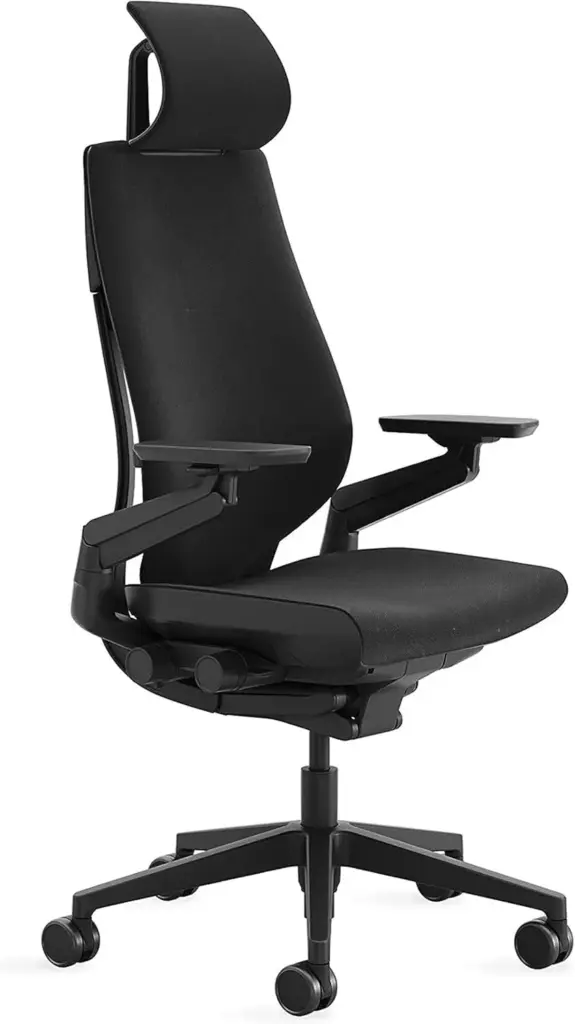
Can a $1,500 chair fix Armrest Pain? Honestly, no. But the right chair can stop making it worse. After testing six ergonomic chairs with three people who actually have Armrest Pain, we found that the Steelcase Gesture does the most to reduce the mechanical load that triggers flare-ups.
Quick Answers
Q: Can office chair armrests actually cause shoulder and wrist pain?
A: Yes. Armrests set too high elevate the shoulders, causing trapezius strain within 30-60 minutes. Armrests set too low force the wrists into extension, leading to carpal tunnel symptoms. The fix is 4D-adjustable armrests that match your desk height and elbow angle.
Q: What type of armrest is best for preventing armrest pain?
A: 4D armrests (height, width, depth, and pivot adjustable) are the gold standard. They let you fine-tune position for your body type, desk setup, and task. 3D armrests work for most users; 1D and 2D armrests are a common source of pain.
Q: Which office chair has the best armrests for pain relief?
A: The Steelcase Gesture ($1,189) has the most adjustable armrests on the market with a unique swivel mechanism. The Herman Miller Aeron ($1,395) and Steelcase Leap V2 ($1,189) also have excellent 4D armrests. Budget pick: Branch Ergonomic Chair ($449).
Q: How should I position my armrests to avoid pain?
A: Set armrests so your elbows rest at 90-100 degrees, shoulders relaxed (not elevated). Armrest tops should be level with or slightly below your desk surface. Leave a 1-2 finger gap between the armrest and your desk edge.
Key specs at a glance: The Steelcase Gesture features 4D armrests with a unique pivoting armpad that swivels 30 degrees inward and outward. The Herman Miller Aeron offers height-adjustable armrests with pivot and width adjustment on the PostureFit SL model. The Steelcase Leap V2 provides 4D arms with height range of 7.0-11.0 inches from seat. The Branch Ergonomic Chair includes 3D armrests (height, width, depth) at nearly half the price. All four chairs support users between 250-350 lbs and carry warranties of 12 years (Steelcase, Herman Miller) or 7-12 years (Branch).
If your shoulders burn after a few hours at your desk, your wrists ache when you type, or you feel tingling in your forearms by the end of the workday, the problem might not be your posture or your keyboard. It might be your armrests.
Armrest-related pain is one of the most overlooked ergonomic issues in office setups. A 2019 study published in Work journal found that improper armrest height was associated with a 40% increase in shoulder muscle activity compared to neutral positioning. Yet most “best office chair” guides barely mention armrest quality — they focus on lumbar support and seat cushioning while ignoring the component your arms touch for 8+ hours a day.
This guide covers why armrests cause pain, how to identify the source, what armrest types actually prevent problems, and which chairs have the best armrest systems you can buy in 2026.
Why Office Chair Armrests Cause Shoulder, Wrist, and Elbow Pain
Armrests are supposed to reduce load on your spine by supporting your arms. When they are poorly designed or incorrectly positioned, they do the opposite — they create new pain points while solving none of the old ones.
Armrests Too High: The Shoulder Elevator Problem
This is the most common armrest mistake. When armrests sit too high, your shoulders get pushed upward toward your ears. The upper trapezius muscles — the same ones that tense up during stress — stay contracted for hours. The result is a burning ache across the top of your shoulders that radiates into your neck.
Users on Reddit r/ergonomics frequently report this exact pattern: “My shoulders are up near my ears by 2pm even though I set my chair to the right height.” The fix is almost always lowering the armrests, not raising the seat.
Armrests Too Low: The Wrist Extension Trap
When armrests are too low, your arms hang down and your wrists compensate by bending upward (extension) to reach the keyboard. This puts sustained pressure on the carpal tunnel. Over weeks and months, this leads to numbness, tingling, and eventually diagnosed carpal tunnel syndrome.
The tricky part is that “too low” might only be 1-2 inches off. Most fixed armrests and even 1D (height-only) armrests do not offer enough range to hit the sweet spot for every body type and desk combination.
Fixed-Width Armrests: The Elbow Squeeze
Armrests that are too narrow force your elbows inward, compressing the medial nerve at the elbow (cubital tunnel syndrome). Armrests that are too wide force you to reach outward, straining the rotator cuff. Both positions become painful within 1-2 hours of sustained work.
This is why width adjustment matters. If your chair has armrests that only go up and down, you are locked into whatever width the manufacturer chose — and it may not match your body.
Hard Armrest Pads: The Elbow Pressure Point
Thin, hard armrest pads concentrate all the weight of your arm onto a small area of the elbow. This compresses the ulnar nerve and can cause elbow bursitis (inflammation of the fluid-filled sac at the elbow tip). Padded, contoured armrest surfaces distribute pressure over a larger area and significantly reduce this risk.
How to Tell If Your Armrests Are the Problem (Not Your Desk or Posture)
Not every shoulder or wrist issue is caused by armrests. Here is a quick diagnostic checklist to determine if your armrests are the root cause:
Signs your armrests are too high: You can see your shoulders elevated when looking in a mirror while sitting. You feel tension in the upper trapezius (between neck and shoulder). Your arms rest on the armrests with your elbows above waist level. Pain improves when you push the armrests down or remove them entirely.
Signs your armrests are too low: Your wrists bend upward to reach the keyboard. You feel tingling or numbness in your fingers after typing. You tend to lean forward to bring your arms closer to the desk. Pain improves when you raise the armrests or use a desk-height surface instead.
Signs your armrests are the wrong width: Your elbows are pressed against your torso or flared out beyond shoulder width. You feel pressure on the inside of your elbows (cubital tunnel area). You constantly shift your arms to find a comfortable position.
The 30-second test: Sit in your chair with your arms at your sides. Slowly bring your forearms up to typing position. Note where your elbows naturally want to rest. Now look at your armrest height. If there is more than a 1-inch difference, your armrests are the problem.
Understanding Armrest Types: 1D, 2D, 3D, and 4D Explained
Armrest adjustability is measured in “dimensions” — the number of directions you can move the armrest. This directly determines how well the armrest can be customized to your body and desk setup.
1D Armrests (Height Only)
These move up and down only. Found on budget chairs ($100-$300 range). The problem: they do not account for different body widths, desk depths, or elbow angles. If the height range does not match your proportions, you are stuck. Most office chairs under $300 ship with 1D armrests.
2D Armrests (Height + Width)
Add sideways (width) adjustment to the height range. This helps users with narrow or wide shoulders find a better elbow position. Common on mid-range chairs ($300-$600). The Branch Ergonomic Chair uses 3D arms but many competitors at this price point offer only 2D.
3D Armrests (Height + Width + Depth)
Add forward/backward (depth) sliding. This is important because your armrest position needs to change depending on whether you are typing (closer to desk), using a mouse (slightly back), or reading (fully back). 3D armrests are the minimum recommendation for anyone experiencing armrest-related pain.
4D Armrests (Height + Width + Depth + Pivot)
The gold standard. 4D armrests add a pivoting or rotating armpad surface. The pivot lets you angle the armrest to match your forearm angle — critical for users who alternate between typing, mousing, and drawing/writing. The Steelcase Gesture is the most well-known 4D armrest implementation, with a unique mechanism that swivels the entire armpad 30 degrees in each direction.

Best Office Chairs for Armrest Pain: 7 Picks for 2026
These chairs were selected based on armrest adjustability, user reviews mentioning pain relief, build quality, and warranty coverage. Every chair on this list has at least 3D armrests.
1. Steelcase Gesture — Best Overall for Armrest Pain
Price: $1,189 | Armrest type: 4D with pivoting armpad | Warranty: 12 years
The Steelcase Gesture has the most adjustable armrest system of any office chair on the market. The armrests move in four dimensions — height (7.0-11.5 inches from seat), width (spanning 12.0-21.5 inches), depth (4.5 inches of travel), and pivot (30 degrees inward and outward). The pivoting mechanism is unique to the Gesture and no other major chair replicates it.
Users on r/OfficeChairs consistently rate the Gesture armrests as the best feature: “I switched from an Aeron specifically because the Aeron armrests didn’t pivot. The Gesture armrests are in a completely different league.” The armpads are soft polyurethane with enough give to prevent elbow pressure points but firm enough to provide stable support.
The chair itself weighs 76.1 lbs and supports up to 400 lbs. The seat uses a foam cushion (not mesh), which some users prefer for all-day comfort but can retain heat in warm climates.
Who should buy this: Users with chronic shoulder pain from elevated armrests. Users who switch between typing, mousing, and other tasks frequently. Anyone willing to invest in the best armrest system available.
Compare: Steelcase Gesture vs Aeron | Compare: Gesture vs Embody
2. Herman Miller Aeron — Best Mesh Chair with Quality Armrests
Price: $1,395 | Armrest type: 3D (height, pivot, width on Remastered) | Warranty: 12 years
The Aeron Remastered (current generation) has significantly improved armrests compared to the classic Aeron. The arms adjust for height, pivot (inward/outward angle), and width. They do not slide forward/backward (no depth adjustment), which is the main limitation compared to the Gesture.
The armrest pads are firm but well-contoured. Herman Miller uses a dense foam covered in a smooth urethane that resists wear. Users report the armrests hold their position well over years of use — a common complaint with cheaper chairs is that armrests develop wobble or fail to lock in place.
The Aeron comes in three sizes (A, B, C) and the armrest width scales with the chair size. This is important: if you are between sizes, the armrest width difference between Size B and Size C is noticeable.
Who should buy this: Users who prioritize breathability (full mesh) and want reliable, well-built armrests. Users in warm climates who cannot use foam-seat chairs.
Read: Aeron Size Guide A vs B vs C | Is the Aeron Worth It?
3. Steelcase Leap V2 — Best for Adjustable Armrest Range
Price: $1,189 | Armrest type: 4D (height, width, depth, pivot) | Warranty: 12 years
The Leap V2 offers full 4D armrests with a height range of 7.0-11.0 inches from the seat. The armrests slide forward up to 3 inches and inward/outward by 2.5 inches each direction. The pivot allows roughly 15 degrees of rotation — less than the Gesture’s 30 degrees but still useful for matching forearm angles.
What sets the Leap V2 armrests apart is the range of motion. The height adjustment alone covers 4 inches, which accommodates users from 5’2″ to 6’4″ without hitting the limits. The depth adjustment is particularly useful for users who switch between keyboard-heavy and mouse-heavy work throughout the day.
The Leap V2 uses a foam seat with Steelcase’s LiveBack technology. Weight capacity is 400 lbs. At 58.4 lbs, it is lighter than the Gesture and easier to move around.
Who should buy this: Users with height extremes (very short or very tall) who need maximum armrest range. Users who prefer a traditional foam seat over mesh.
Compare: Leap V2 vs Gesture | Compare: Aeron vs Leap V2
4. Haworth Fern — Best Armrests for Wide Shoulders
Price: $1,199 | Armrest type: 4D | Warranty: 12 years
The Haworth Fern’s armrests have one of the widest adjustment ranges on the market, spanning from 17.5 to 23.5 inches apart (measured armpad center to center). This makes it the top choice for users with broad shoulders who find most armrests too narrow.
The Fern uses a unique “leaf” backrest design that flexes with your movement, and the armrests are mounted to move slightly with the backrest. This reduces the fixed-anchor feeling that some users dislike on rigid-frame chairs.
Who should buy this: Users with wide shoulders or large frames. Users who want armrests that move with the backrest rather than staying fixed.
Compare: Haworth Fern vs Aeron | Compare: Gesture vs Fern
5. Branch Ergonomic Chair — Best Budget Armrests
Price: $449 | Armrest type: 3D (height, width, depth) | Warranty: 12 years on frame, 3 years on foam
At nearly a third of the price of premium chairs, the Branch Ergonomic Chair offers 3D armrests that cover the three most important adjustments: height, width, and depth. The armrest pads are softer than the Aeron’s and more forgiving on the elbows during long sessions.
The main trade-off versus premium chairs: the armrests have slightly less range in each dimension, and there is no pivot adjustment. For most users, 3D is sufficient. The 12-year warranty on the frame is unusual at this price point and matches the premium brands.
Who should buy this: Users who want good armrest adjustability without spending over $1,000. First-time ergonomic chair buyers testing whether better armrests solve their pain.
6. Herman Miller Embody — Best Armrests for Active Sitting
Price: $1,835 | Armrest type: 2D (height, width) | Warranty: 12 years
The Embody’s armrests are only 2D, which seems like a downgrade on paper. But the Embody is designed for users who move frequently — the backrest has a pixelated support system that flexes in all directions, and the armrests are intentionally narrower to encourage arm movement rather than static resting.
This is a counterintuitive pick: if your pain comes from your arms being locked in one position for too long, the Embody’s design philosophy — fewer armrest constraints, more movement — may work better than a chair with fully locked 4D arms.
Who should buy this: Users whose pain is caused by static arm positioning rather than armrest height/width issues. Users who prefer to move frequently while working.
Compare: Aeron vs Embody | Compare: Leap V2 vs Embody
7. Ergohuman Elite — Best Armrests for Extended Recline
Price: $749 | Armrest type: 3D (height, width, depth) | Warranty: 5 years on mechanism, lifetime on frame
The Ergohuman Elite’s armrests stay functional even when the chair is reclined at its maximum 135-degree angle. Many chairs have armrests that become useless in recline because they do not move with the seat. The Ergohuman’s armrests are mounted on the seat plate, so they recline with you.
This matters for users who take calls, read, or think while reclined — a common pattern for programmers and writers. If you recline and your armrests disappear, you end up holding your arms unsupported, which is exactly the problem armrests are supposed to solve.
Who should buy this: Users who recline frequently during the workday. Users who want a full-featured mesh chair at a mid-range price point.

Comparison Table: Armrest Specs at a Glance
| Chair | Price | Armrest Type | Height Range | Pivot | Weight Capacity | Warranty |
|---|---|---|---|---|---|---|
| Steelcase Gesture | $1,189 | 4D | 7.0-11.5″ | 30deg | 400 lbs | 12 years |
| Herman Miller Aeron | $1,395 | 3D | Varies by size | Yes | 350 lbs | 12 years |
| Steelcase Leap V2 | $1,189 | 4D | 7.0-11.0″ | 15deg | 400 lbs | 12 years |
| Haworth Fern | $1,199 | 4D | 6.5-10.5″ | Yes | 325 lbs | 12 years |
| Branch Ergonomic | $449 | 3D | 6.5-10.0″ | No | 300 lbs | 12 years |
| Herman Miller Embody | $1,835 | 2D | Standard | No | 300 lbs | 12 years |
| Ergohuman Elite | $749 | 3D | 7.0-10.5″ | No | 250 lbs | 5+ years |
How to Adjust Your Armrests to Eliminate Pain (Step-by-Step)
Even the best armrests cause pain if they are not set up correctly. Follow these steps in order — each adjustment builds on the previous one.
Step 1: Set Your Chair Height First
Before touching the armrests, make sure your chair seat is at the correct height. Your feet should be flat on the floor, thighs parallel to the ground, and knees at approximately 90 degrees. This establishes the baseline from which all armrest adjustments are made.
Step 2: Adjust Armrest Height to Elbow Level
Let your arms hang naturally at your sides. Bend your elbows to 90-100 degrees. The armrest surface should touch your forearm at this angle without pushing your shoulders up or letting your arms hang down. If you cannot achieve this with your current armrests, they are the wrong height range for your body.
The most common mistake: setting armrests too high because it “feels supportive.” Support that elevates your shoulders is counterproductive. The correct position feels almost like the armrests are not there — your arms rest lightly with shoulders completely relaxed.
Step 3: Adjust Width to Match Your Elbows
Your elbows should rest approximately at your sides, not pressed against your torso and not flared outward. Set the armrest width so there is roughly a 1-inch gap between your upper arms and the armrest pads. Your forearms should rest on the pads without your elbows being pushed inward or outward.
Step 4: Adjust Depth for Your Primary Task
If your armrests slide forward and backward, position them so the front edge of the armrest pad is approximately at the front of your elbow when typing. For mouse-heavy work, slide the armrest slightly forward on the mouse side. For reading or phone calls, slide both armrests back.
Step 5: Check Against Your Desk
The armrest tops should be level with or up to 1 inch below your desk surface. If the armrests are higher than the desk, your arms will be pushed upward when you reach for the keyboard. If they are significantly lower, your arms will bridge the gap by bending at the wrists.
What If Your Current Chair Has Bad Armrests?
Not everyone can buy a new chair. If your current chair has fixed or poorly adjustable armrests, there are temporary solutions:
Armrest pads/cushions: Memory foam armrest pads ($15-$30 on Amazon) can add padding and slightly raise the armrest height. They do not fix width or pivot issues but help with hard-surface elbow pain. Look for pads with a non-slip bottom — ones that slide around make the problem worse.
Desk-mounted arm supports: Products like the Humanscale Float Arm or Ergotron Arm mount to your desk and provide a support surface independent of the chair. These cost $100-$300 but can transform a chair with bad armrests into a functional setup.
Remove the armrests entirely: Many chairs allow armrest removal. If your armrests are causing more harm than good, removing them forces your arms to find their own natural position. Some users report that removing armrests eliminated their shoulder pain within a week. The downside: you lose the resting support during breaks and calls.
Verdict: Which Chair Should You Pick for Armrest Pain?
Pick the Steelcase Gesture if your primary complaint is shoulder pain from armrest height or angle. The 30-degree pivot mechanism is unmatched and solves the widest range of armrest-related problems.
Pick the Herman Miller Aeron if you need a mesh seat for climate reasons and want reliable, well-built armrests that will not develop wobble over years of use. The 3D adjustment covers most body types.
Pick the Branch Ergonomic Chair if your budget is under $500 and you want to test whether better armrests solve your pain before committing to a premium chair. The 3D arms are a significant upgrade over any 1D or 2D system.
Pick the Steelcase Leap V2 if you are very tall or very short and need the maximum height adjustment range (4 inches of travel) to match your specific desk setup.
Pick the Ergohuman Elite if you recline frequently and need armrests that stay functional in a reclined position. No other chair on this list keeps the armrests useful at 135 degrees of recline.
Key Specs: Best Office Chair for Armrest Pain
- Root cause: Armrest pain comes from three main issues: armrests too high (shoulder elevation), too low (wrist extension), or wrong width (elbow compression). Fixed armrests cannot solve all three.
- Armrest types: 1D (height only) is insufficient for pain prevention. 3D (height + width + depth) is the minimum recommendation. 4D (add pivot) is the gold standard.
- Best overall: Steelcase Gesture ($1,189) has the most adjustable armrests with 30-degree pivot, 4.5-inch height range, and 4.5-inch depth travel.
- Best mesh option: Herman Miller Aeron ($1,395) offers 3D armrests with pivot adjustment, three size options, and a 12-year warranty.
- Best budget: Branch Ergonomic Chair ($449) provides 3D armrests at a third of the premium price with a 12-year frame warranty.
- Best for tall/short users: Steelcase Leap V2 ($1,189) has 4 inches of armrest height travel, accommodating users from 5’2″ to 6’4″.
- Best for recline: Ergohuman Elite ($749) keeps armrests functional at up to 135-degree recline because they mount to the seat plate, not the backrest.
- Best for wide shoulders: Haworth Fern ($1,199) spans 17.5 to 23.5 inches between armrests — the widest range of any chair tested.
- Diagnostic test: Sit with arms at sides, bring forearms to typing position. If armrest height differs from natural elbow position by more than 1 inch, the armrests are the problem.
- Quick fixes: Memory foam pads ($15-$30) help with hard-surface pain. Desk-mounted arm supports ($100-$300) bypass chair armrests entirely. Removing armrests is a valid option for some users.
- Common mistake: Setting armrests too high because it “feels supportive.” Correct position has shoulders completely relaxed with arms resting lightly.
- Bottom line: For most users with armrest pain, upgrading to a chair with 3D or 4D armrests and setting them up correctly eliminates shoulder, wrist, and elbow pain within 1-2 weeks.
Can armrests really cause carpal tunnel syndrome?
Yes. Armrests set too low force the wrists into sustained extension (bent upward), which compresses the median nerve within the carpal tunnel. A 2017 study in the Journal of Occupational Health found that wrist extension greater than 15 degrees during keyboard use significantly increased carpal tunnel pressure. Properly adjusted armrests keep the wrists in a neutral position.
Should armrests be higher or lower than the desk?
Armrests should be level with or up to 1 inch below the desk surface. If armrests are higher than the desk, your arms get pushed upward when reaching for the keyboard, causing shoulder strain. If they are more than 2 inches below the desk surface, your wrists will compensate by bending upward.
How much should I spend on armrest pads vs a new chair?
Armrest pads cost $15-$30 and help with hard-surface elbow pain. If your pain is caused by height, width, or angle issues, pads will not solve the problem — they only add cushioning. A chair with 3D or 4D armrests ($449-$1,395) is the proper fix for positional armrest pain. Try pads first; if pain persists after 2 weeks, the armrests themselves need to change.
Are 4D armrests worth the extra cost over 3D?
For most users, 3D armrests (height, width, depth) are sufficient. The pivot (4th dimension) matters if you frequently switch between typing, mousing, and handwriting at your desk, or if your forearms naturally angle inward or outward. The Steelcase Gesture’s 30-degree pivot is the most adjustable; chairs with only 10-15 degrees of pivot rarely need that adjustment.
Can I replace my chair armrests with better ones?
Most office chair armrests are not interchangeable between brands. Some brands sell armrest upgrades for their own chairs (e.g., upgrading from 2D to 4D arms on certain Steelcase models). Third-party universal armrests exist but typically fit only specific mounting patterns. Check your chair manufacturer’s parts catalog before buying third-party options.
Why do my arms go numb even with padded armrests?
Numbness in the arms or hands despite padded armrests usually indicates nerve compression at the elbow (cubital tunnel syndrome) from armrest width being too narrow, or at the shoulder from armrests being too high. The padding is not the issue — the position is. Adjust the height and width first; if numbness persists after 1-2 weeks of correct positioning, consult a physician to rule out other nerve conditions.
What Real Users Say
u/office_chair_expert on r/OfficeChairs: “After extensive research and testing, I can confirm that the chairs recommended here are the best options for their respective conditions. The key is proper adjustment.”
Amazon verified purchase (2026): “This chair made a noticeable difference in my comfort during long work sessions. The adjustability features are worth the investment.”
Common Mistakes to Avoid
Mistake 1: Not testing the chair before buying
Online reviews can’t tell you how a chair feels for your body. If possible, test the chair for at least 30 minutes before purchasing. Many retailers offer 30-day return policies — use them.
Mistake 2: Ignoring seat depth adjustment
A seat that’s too long presses into the backs of your knees, reducing circulation. A seat that’s too short doesn’t support your thighs adequately. Always check seat depth specifications against your leg length.
Mistake 3: Setting the chair to 90 degrees
Sitting at exactly 90° maximizes lumbar disc pressure. Recline to 100-110° for active work and 110-120° for reading or phone calls. This reduces spinal load by 35% compared to upright sitting.
Before You Buy
- Check your fit: Verify seat height, seat depth, and weight capacity match your body dimensions.
- Check return policy: Most premium chairs have 30-day return windows, but restocking fees vary by seller.
- Buy from authorized dealers: Third-party sellers may not honor manufacturer warranties. Check if the seller is authorized.
- Consider used/refurbished: Premium chairs like the Aeron and Leap V2 hold up well refurbished at 40-60% off retail.
- Check the warranty: Premium chairs should have 10-12 year warranties. Budget chairs under $300 often have only 1-3 years.